> ## Documentation Index
> Fetch the complete documentation index at: https://docs.cendra.ai/llms.txt
> Use this file to discover all available pages before exploring further.
# Unified Inbox
> Cendra's unified inbox consolidates guest messages from WhatsApp, email, and booking platforms like Airbnb and Booking.com via your PMS into a single view with AI-powered suggestions, reservation context, and team collaboration tools.
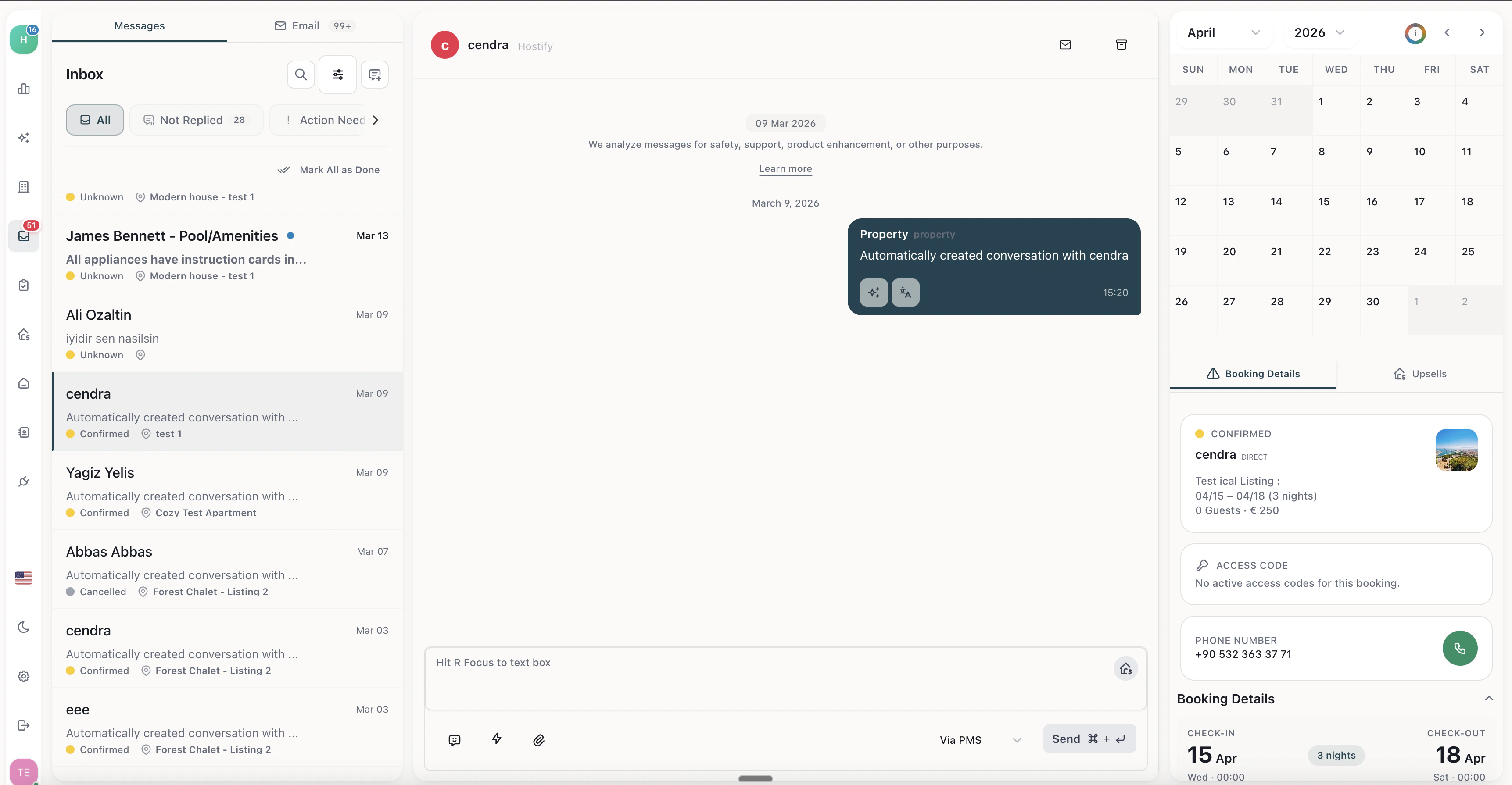
Cendra's unified inbox consolidates guest messages from WhatsApp, email, and booking platforms like Airbnb and Booking.com into a single view. Every guest conversation — regardless of channel — appears in one place with AI-powered suggestions, live reservation context, and team collaboration tools.
## What the Unified Inbox Does
* **Single view for all channels** — WhatsApp, email, and OTA messages in one list. No switching between apps.
* **AI-powered suggestions** — Cendra's AI suggests responses for every incoming message, grounded in your property data and reservation context.
* **Reservation sidebar** — See the guest's booking details (check-in date, property, guest count, status) alongside the conversation without leaving the inbox.
* **Search and filter** — Find conversations by guest name, property, channel, status, or label. Autocomplete search helps you find what you need fast.
* **Message status** — Track which messages are handled by AI, which need human review, and which are escalated.
* **Translation** — Communicate with guests in any language. Cendra translates incoming messages and lets you respond in the guest's preferred language.
* **Team collaboration** — Multiple team members can access the same inbox, assign conversations, and leave internal notes.
Navigate to Inbox to see all guest conversations: [https://app.cendra.ai/inbox](https://app.cendra.ai/inbox)
 ## How Messages Flow
```
Guest sends message (WhatsApp / Email)
↓
Cendra receives message in unified inbox
↓
AI processes message through response pipeline
↓
┌─────────────────────────────────────────┐
│ Autopilot mode → AI sends automatically │
│ Semi-auto mode → AI queues for review │
│ Manual mode → AI suggests response │
└─────────────────────────────────────────┘
↓
Response sent to guest via original channel
```
## Message Categories
Cendra automatically categorizes messages to help you prioritize:
| Category | Description |
| ----------------------- | -------------------------------------------------------------------------------------- |
| **Automated** | Handled by AI — no action needed |
| **Needs attention** | AI flagged for human review (guardrail triggered, low confidence, or escalation rule) |
| **Semi-automated** | AI prepared a response that needs your approval before sending |
| **Missing information** | Guest asked something the AI doesn't have knowledge for — add it to the knowledge base |
## Connecting Your Channels
To use the unified inbox, connect at least one communication channel:
* **WhatsApp Business** — Connect via WhatsApp Business API. [Setup guide →](/inbox/whatsapp-business)
* **Gmail** — Connect via Google OAuth in Settings → Email
* **Outlook** — Connect via Microsoft OAuth in Settings → Email
All channels sync in real time. New messages appear in the inbox within seconds.
## How Messages Flow
```
Guest sends message (WhatsApp / Email)
↓
Cendra receives message in unified inbox
↓
AI processes message through response pipeline
↓
┌─────────────────────────────────────────┐
│ Autopilot mode → AI sends automatically │
│ Semi-auto mode → AI queues for review │
│ Manual mode → AI suggests response │
└─────────────────────────────────────────┘
↓
Response sent to guest via original channel
```
## Message Categories
Cendra automatically categorizes messages to help you prioritize:
| Category | Description |
| ----------------------- | -------------------------------------------------------------------------------------- |
| **Automated** | Handled by AI — no action needed |
| **Needs attention** | AI flagged for human review (guardrail triggered, low confidence, or escalation rule) |
| **Semi-automated** | AI prepared a response that needs your approval before sending |
| **Missing information** | Guest asked something the AI doesn't have knowledge for — add it to the knowledge base |
## Connecting Your Channels
To use the unified inbox, connect at least one communication channel:
* **WhatsApp Business** — Connect via WhatsApp Business API. [Setup guide →](/inbox/whatsapp-business)
* **Gmail** — Connect via Google OAuth in Settings → Email
* **Outlook** — Connect via Microsoft OAuth in Settings → Email
All channels sync in real time. New messages appear in the inbox within seconds.