> ## Documentation Index
> Fetch the complete documentation index at: https://docs.cendra.ai/llms.txt
> Use this file to discover all available pages before exploring further.
# AI Rules & Guardrails
> Cendra AI Rules are configurable guardrails that control what your AI agent can and cannot do. Set safety boundaries, restrict topics, enforce tone, and apply rules conditionally using labels.
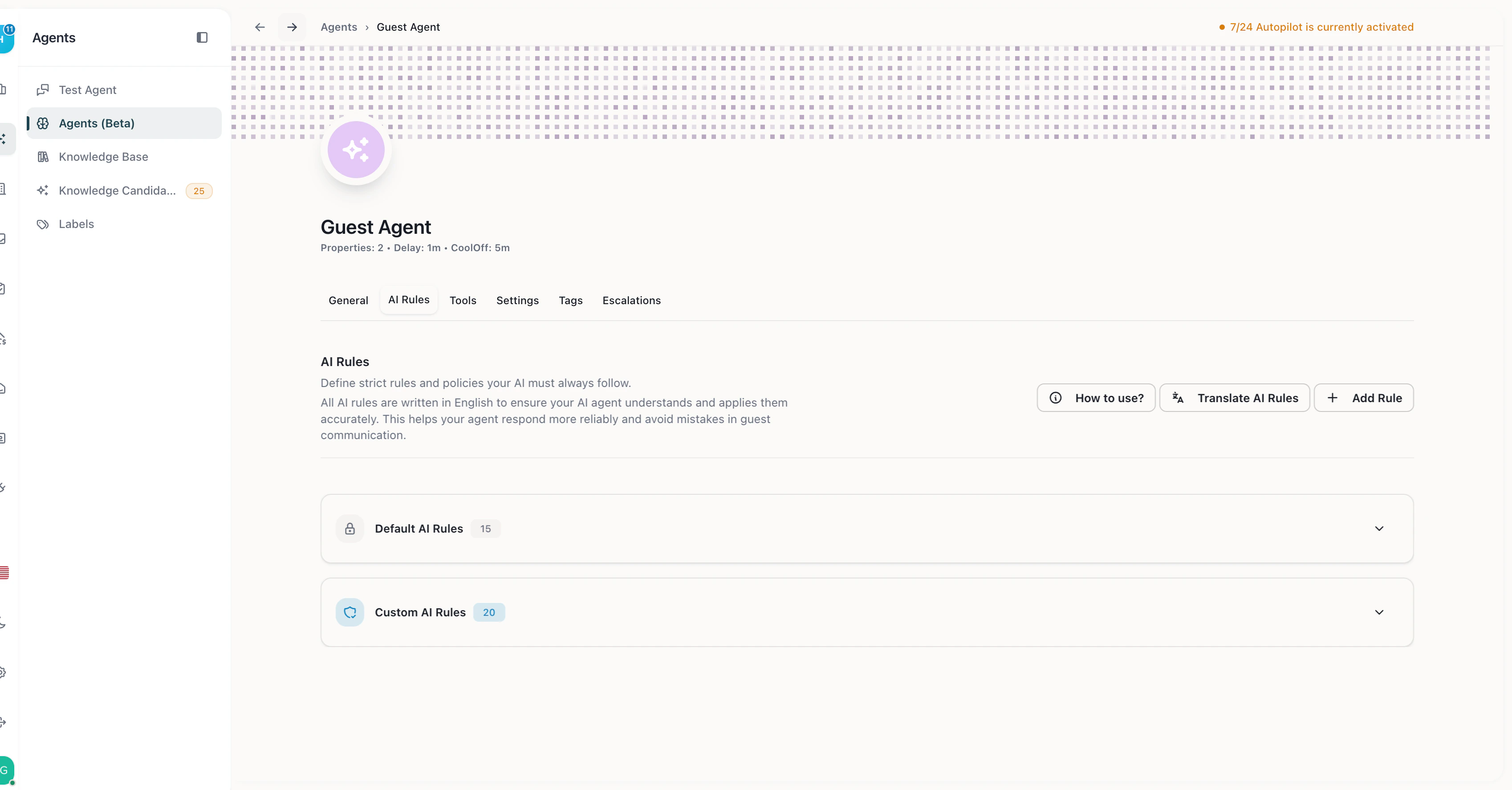
Cendra AI Rules are configurable guardrails that control what your AI agent can and cannot do. They define safety boundaries, restrict topics, enforce behavioral constraints, and can be applied conditionally using labels.
## How AI Rules Work
AI Rules are checked before every response the AI generates. If a rule applies to the current conversation, the AI follows it — regardless of what the guest asks.
There are two types of rules:
| Type | Description | Editable |
| ----------------- | ---------------------------------------- | -------------- |
| **Default rules** | System-provided safety guardrails | Read-only |
| **Custom rules** | Rules you create for your specific needs | Fully editable |
Navigate to Agent Hub → your agent → AI Rules to configure guardrails: [https://app.cendra.ai/agents](https://app.cendra.ai/agents)
 ## Default Rules
Cendra includes built-in safety rules that cannot be modified or deleted. These cover:
* Payment information handling
* Data privacy boundaries
* Escalation triggers for sensitive topics
* Baseline safety constraints
## Custom Rules
Create rules that match your business needs. Each rule has:
* **Title** — short description of the rule
* **Description** — detailed text explaining what the AI should or should not do
### Example Custom Rules
| Rule | Description |
| ------------------------ | ---------------------------------------------------------------------------------------------------------------- |
| Never discuss refunds | "Do not offer, promise, or discuss refund amounts. Escalate all refund requests to a human team member." |
| No financial commitments | "Never commit to discounts, price adjustments, or compensation without human approval." |
| Escalate complaints | "If a guest expresses frustration, anger, or dissatisfaction, escalate the conversation immediately." |
| Parking instructions | "When asked about parking, always reference the property-specific parking instructions from the knowledge base." |
| Early check-in policy | "Early check-in requests should be offered as an upsell at \$30/hour. Do not approve free early check-in." |
## Conditional Rules with Labels
AI Rules can be **restricted to specific labels**, making them apply only when certain conditions are met. For example:
* A rule that only activates for VIP guests (labeled "VIP")
* A rule that changes behavior for returning guests (labeled "Returning Guest")
* A rule that applies different escalation thresholds for high-value bookings
To add a condition, assign a **label restriction** when creating or editing a rule. The rule will only apply to conversations that match the assigned label.
[Learn more about Labels →](/ai-agents/labels)
## CORA — Conversational Orchestration & Rule Agent
CORA is Cendra's natural language rule creation system. Instead of navigating dashboards and filling out forms, you describe what you want in plain English — and CORA translates it into functional AI rules, labels, tags, and behavioral policies automatically.
## Default Rules
Cendra includes built-in safety rules that cannot be modified or deleted. These cover:
* Payment information handling
* Data privacy boundaries
* Escalation triggers for sensitive topics
* Baseline safety constraints
## Custom Rules
Create rules that match your business needs. Each rule has:
* **Title** — short description of the rule
* **Description** — detailed text explaining what the AI should or should not do
### Example Custom Rules
| Rule | Description |
| ------------------------ | ---------------------------------------------------------------------------------------------------------------- |
| Never discuss refunds | "Do not offer, promise, or discuss refund amounts. Escalate all refund requests to a human team member." |
| No financial commitments | "Never commit to discounts, price adjustments, or compensation without human approval." |
| Escalate complaints | "If a guest expresses frustration, anger, or dissatisfaction, escalate the conversation immediately." |
| Parking instructions | "When asked about parking, always reference the property-specific parking instructions from the knowledge base." |
| Early check-in policy | "Early check-in requests should be offered as an upsell at \$30/hour. Do not approve free early check-in." |
## Conditional Rules with Labels
AI Rules can be **restricted to specific labels**, making them apply only when certain conditions are met. For example:
* A rule that only activates for VIP guests (labeled "VIP")
* A rule that changes behavior for returning guests (labeled "Returning Guest")
* A rule that applies different escalation thresholds for high-value bookings
To add a condition, assign a **label restriction** when creating or editing a rule. The rule will only apply to conversations that match the assigned label.
[Learn more about Labels →](/ai-agents/labels)
## CORA — Conversational Orchestration & Rule Agent
CORA is Cendra's natural language rule creation system. Instead of navigating dashboards and filling out forms, you describe what you want in plain English — and CORA translates it into functional AI rules, labels, tags, and behavioral policies automatically.
 ### How CORA Works
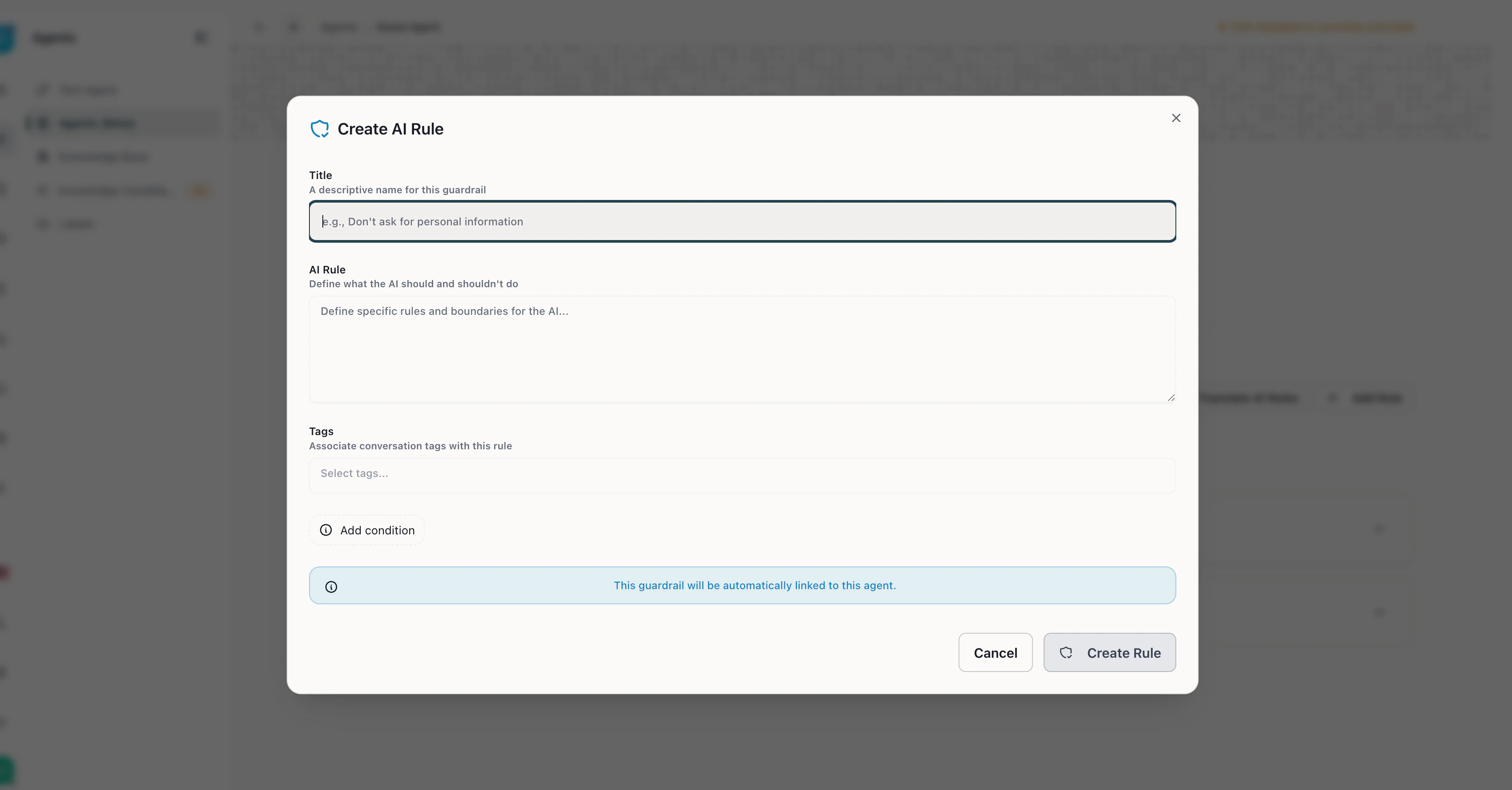
1. **Click "Add Rule"** in the AI Rules tab to open CORA's rule creator
2. **Write a title** — a descriptive name (e.g., "Don't ask for personal information")
3. **Describe the rule in natural language** — tell CORA what the AI should or shouldn't do (e.g., "Never promise refunds without manager approval")
4. **Associate tags** — optionally link the rule to conversation tags so it only applies to specific scenarios
5. **Add conditions** — optionally restrict the rule to specific labels (e.g., only for VIP guests)
6. **Create Rule** — the rule goes live immediately, no restart required
### What CORA Can Create
| Rule type | Example natural language input |
| ----------------------- | ------------------------------------------------ |
| **Labels** | "Flag VIP guests with reservations over €1,000" |
| **Tags** | "Auto-detect cleanliness complaints" |
| **AI Rules** | "Never promise refunds without manager approval" |
| **Escalations** | "Escalate any message mentioning legal action" |
| **Behavioral policies** | "Use formal tone for business travelers" |
### Why CORA Matters
Property managers told us: "Cendra's AI works great when set up right — but setting it up feels like programming." CORA eliminates this setup friction. Instead of learning how labels, tags, and rules connect, you just describe what you want in conversation. CORA handles the rest.
* **Lower barrier** — no technical knowledge required to create complex rules
* **Conflict detection** — CORA checks new rules against existing ones to prevent conflicts
* **Higher automation coverage** — more rules correctly configured = more messages handled by AI
## Managing AI Rules
* **Create** — click "Add Rule" and define the title and description
* **Edit** — click any existing custom rule to modify it inline
* **Delete** — remove custom rules you no longer need
* Rules are sorted by creation date (newest first)
* Changes take effect immediately — no restart required
### How CORA Works
1. **Click "Add Rule"** in the AI Rules tab to open CORA's rule creator
2. **Write a title** — a descriptive name (e.g., "Don't ask for personal information")
3. **Describe the rule in natural language** — tell CORA what the AI should or shouldn't do (e.g., "Never promise refunds without manager approval")
4. **Associate tags** — optionally link the rule to conversation tags so it only applies to specific scenarios
5. **Add conditions** — optionally restrict the rule to specific labels (e.g., only for VIP guests)
6. **Create Rule** — the rule goes live immediately, no restart required
### What CORA Can Create
| Rule type | Example natural language input |
| ----------------------- | ------------------------------------------------ |
| **Labels** | "Flag VIP guests with reservations over €1,000" |
| **Tags** | "Auto-detect cleanliness complaints" |
| **AI Rules** | "Never promise refunds without manager approval" |
| **Escalations** | "Escalate any message mentioning legal action" |
| **Behavioral policies** | "Use formal tone for business travelers" |
### Why CORA Matters
Property managers told us: "Cendra's AI works great when set up right — but setting it up feels like programming." CORA eliminates this setup friction. Instead of learning how labels, tags, and rules connect, you just describe what you want in conversation. CORA handles the rest.
* **Lower barrier** — no technical knowledge required to create complex rules
* **Conflict detection** — CORA checks new rules against existing ones to prevent conflicts
* **Higher automation coverage** — more rules correctly configured = more messages handled by AI
## Managing AI Rules
* **Create** — click "Add Rule" and define the title and description
* **Edit** — click any existing custom rule to modify it inline
* **Delete** — remove custom rules you no longer need
* Rules are sorted by creation date (newest first)
* Changes take effect immediately — no restart required