> ## Documentation Index
> Fetch the complete documentation index at: https://docs.cendra.ai/llms.txt
> Use this file to discover all available pages before exploring further.
# Agent Hub
> Cendra's Agent Hub is the central configuration interface for creating and managing AI agents. Configure tone, working mode, response language, tools, and automation settings for each agent.
Cendra's Agent Hub is the central configuration interface for creating and managing AI agents. Each agent has its own identity, tone, working mode, and set of rules — giving you granular control over how AI handles guest communication for different properties or scenarios.
## Creating an Agent
1. Navigate to **Agent Hub → Agents**
2. Click **Create Agent**
3. Configure the agent's identity:
* **Agent name** — a descriptive name (e.g., "Guest Support Agent", "Owner Communication")
* **Active status** — toggle to activate or deactivate the agent
## Agent Configuration Tabs
Each agent has 6 configuration tabs:
| Tab | What it controls |
| ----------------------------------------- | ------------------------------------------------------ |
| [**General**](#general) | Agent identity, custom instructions, tone, signature |
| [**AI Rules**](/ai-agents/ai-rules) | Safety guardrails and behavioral restrictions |
| [**Tools**](#tools) | Response language, AI capabilities, automation toggles |
| [**Settings**](#settings) | Working mode, schedule, response timing, scope |
| [**Tags**](/ai-agents/tags) | Conversation categorization with escalation levels |
| [**Escalations**](/ai-agents/escalations) | Rules for when to hand off to humans |
Navigate to Agent Hub → Agents to manage your AI agents: [https://app.cendra.ai/agents](https://app.cendra.ai/agents)
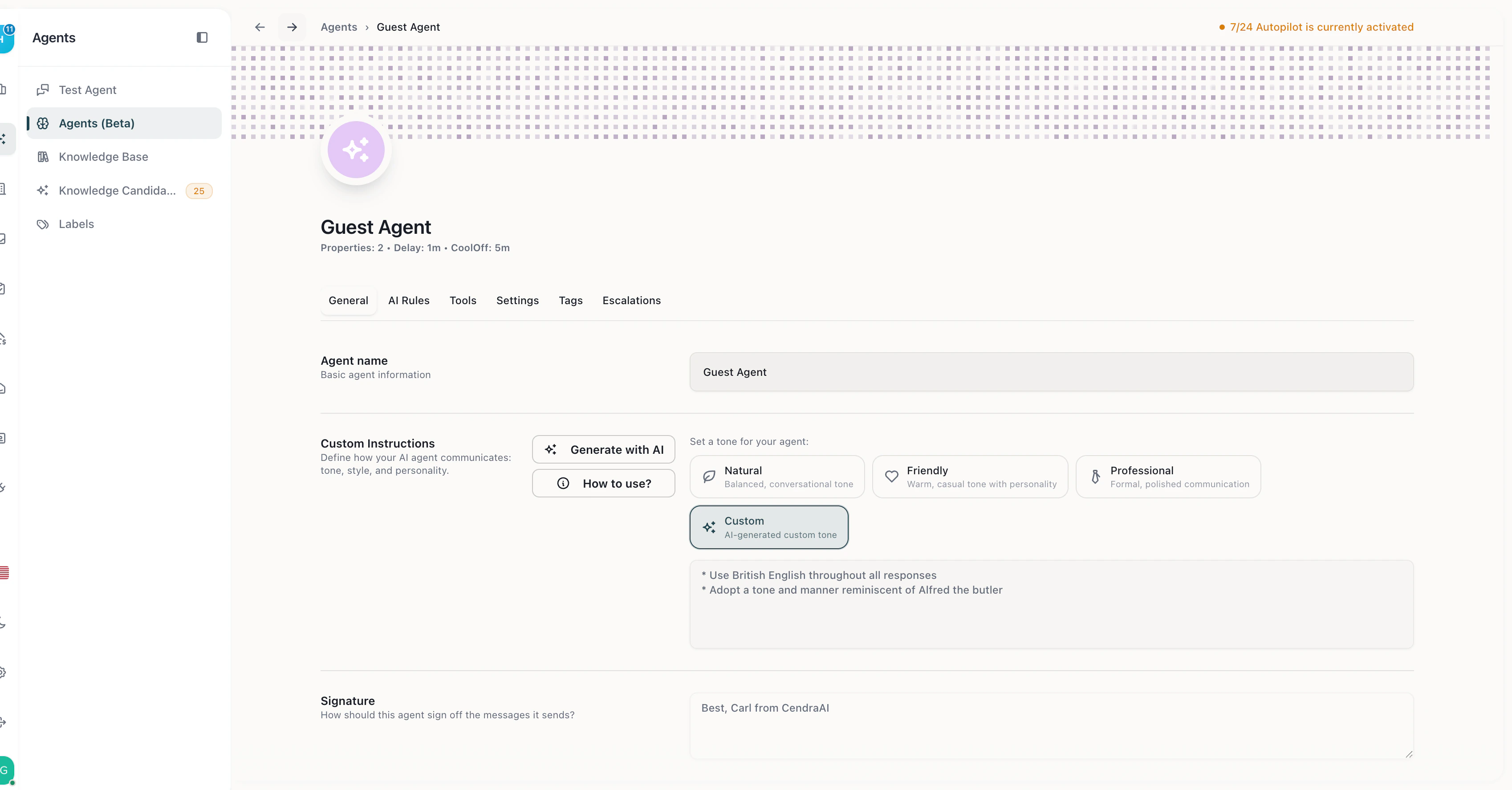 ## General
### Custom Instructions
Define how your AI agent should behave — its personality, communication style, and constraints. This is a free-text field where you describe what the agent should do and how.
### Tone Selection
Choose from 8 built-in tone templates:
| Tone | Style |
| -------------- | ------------------------------------------ |
| Professional | Business-appropriate, clear, and courteous |
| Friendly | Warm, approachable, conversational |
| Formal | Structured, respectful, traditional |
| Casual | Relaxed, informal, natural |
| Technical | Precise, detailed, informative |
| Conversational | Natural flow, engaging, personable |
| Empathetic | Understanding, supportive, caring |
| Assertive | Confident, direct, action-oriented |
You can also create a **custom tone** by describing your preferred style and adding extra instructions.
### Signature
Append a custom signature to every AI-generated message — useful for branding or compliance.
## Tools
### Response Language
Choose from **90+ languages** for AI responses. Options include:
* **Match Customer Language** (default) — AI responds in whatever language the guest writes in
* Any specific language — English, Spanish, French, German, Arabic, Chinese, Japanese, Turkish, Portuguese, and 80+ more
### AI Capabilities
Toggle these features on or off per agent:
| Capability | What it does |
| -------------------------------- | -------------------------------------------------------------------- |
| **Search Internet** | AI can access weather, local recommendations, directions, and events |
| **Search Availability** | AI can check property availability and booking status |
| **Suggest Alternative Listings** | AI recommends other properties when the requested one is unavailable |
### Auto Mark as Done
When enabled, Cendra automatically marks conversations as resolved after the AI responds successfully.
## Settings
### Working Mode
Control when and how the AI responds:
| Mode | Behavior |
| ------------------- | --------------------------------------------------- |
| **24/7 Autopilot** | AI responds at all hours, fully autonomous |
| **Semi-Auto** | AI drafts responses for human review before sending |
| **Business Hours** | AI responds only during configured working hours |
| **Custom Schedule** | Set specific days and time windows for AI responses |
### Response Timing
Fine-tune response behavior:
* **Response delay** — 0 to 10 minutes before the AI responds (makes responses feel more natural)
* **Cool-off period** — minimum wait time between consecutive AI messages (0 to 10 minutes)
### Timezone
* **Match Property Timezone** (default) — AI uses each property's timezone for scheduling
* **Manual selection** — choose from 500+ IANA timezones
### Reservation Status Filter
Select which booking stages trigger AI responses:
| Status | Description |
| ------------------ | --------------------------------- |
| Inquiry | Guest has inquired but not booked |
| Follow-up | Awaiting guest response |
| Confirmed | Booking confirmed |
| Arriving in 2 days | Guest arriving soon |
| Check-in today | Arrival day |
| Check-in tomorrow | Day before arrival |
| Currently hosting | Guest is currently staying |
| Check-out today | Departure day |
| Post-stay | After checkout |
| Expired | Booking expired |
### Property Assignment
Assign the agent to specific properties, or leave empty to handle all properties in the workspace.
## General
### Custom Instructions
Define how your AI agent should behave — its personality, communication style, and constraints. This is a free-text field where you describe what the agent should do and how.
### Tone Selection
Choose from 8 built-in tone templates:
| Tone | Style |
| -------------- | ------------------------------------------ |
| Professional | Business-appropriate, clear, and courteous |
| Friendly | Warm, approachable, conversational |
| Formal | Structured, respectful, traditional |
| Casual | Relaxed, informal, natural |
| Technical | Precise, detailed, informative |
| Conversational | Natural flow, engaging, personable |
| Empathetic | Understanding, supportive, caring |
| Assertive | Confident, direct, action-oriented |
You can also create a **custom tone** by describing your preferred style and adding extra instructions.
### Signature
Append a custom signature to every AI-generated message — useful for branding or compliance.
## Tools
### Response Language
Choose from **90+ languages** for AI responses. Options include:
* **Match Customer Language** (default) — AI responds in whatever language the guest writes in
* Any specific language — English, Spanish, French, German, Arabic, Chinese, Japanese, Turkish, Portuguese, and 80+ more
### AI Capabilities
Toggle these features on or off per agent:
| Capability | What it does |
| -------------------------------- | -------------------------------------------------------------------- |
| **Search Internet** | AI can access weather, local recommendations, directions, and events |
| **Search Availability** | AI can check property availability and booking status |
| **Suggest Alternative Listings** | AI recommends other properties when the requested one is unavailable |
### Auto Mark as Done
When enabled, Cendra automatically marks conversations as resolved after the AI responds successfully.
## Settings
### Working Mode
Control when and how the AI responds:
| Mode | Behavior |
| ------------------- | --------------------------------------------------- |
| **24/7 Autopilot** | AI responds at all hours, fully autonomous |
| **Semi-Auto** | AI drafts responses for human review before sending |
| **Business Hours** | AI responds only during configured working hours |
| **Custom Schedule** | Set specific days and time windows for AI responses |
### Response Timing
Fine-tune response behavior:
* **Response delay** — 0 to 10 minutes before the AI responds (makes responses feel more natural)
* **Cool-off period** — minimum wait time between consecutive AI messages (0 to 10 minutes)
### Timezone
* **Match Property Timezone** (default) — AI uses each property's timezone for scheduling
* **Manual selection** — choose from 500+ IANA timezones
### Reservation Status Filter
Select which booking stages trigger AI responses:
| Status | Description |
| ------------------ | --------------------------------- |
| Inquiry | Guest has inquired but not booked |
| Follow-up | Awaiting guest response |
| Confirmed | Booking confirmed |
| Arriving in 2 days | Guest arriving soon |
| Check-in today | Arrival day |
| Check-in tomorrow | Day before arrival |
| Currently hosting | Guest is currently staying |
| Check-out today | Departure day |
| Post-stay | After checkout |
| Expired | Booking expired |
### Property Assignment
Assign the agent to specific properties, or leave empty to handle all properties in the workspace.